
Attack mode & alerts
How attack mode stops a bot flood even in monitor mode, and how staff hear about it in chat, the console and Discord.
Attack mode

Attack mode is for the moment a bot flood starts while you are still in monitor mode.
- Kalkan counts the logins that would be kicked or are kicked (connection types and country rules) over a sliding one-minute window.
- When the count reaches
threshold-per-minute(30), attack mode starts: forduration-minutes(15) those logins are kicked even in monitor mode. - While the wave goes on, every further blocked login pushes the end time back.
- It is off by default. Turn it on with the Attack mode button or
/kalkan set attack-mode on. Turning it off ends an attack in progress at once.
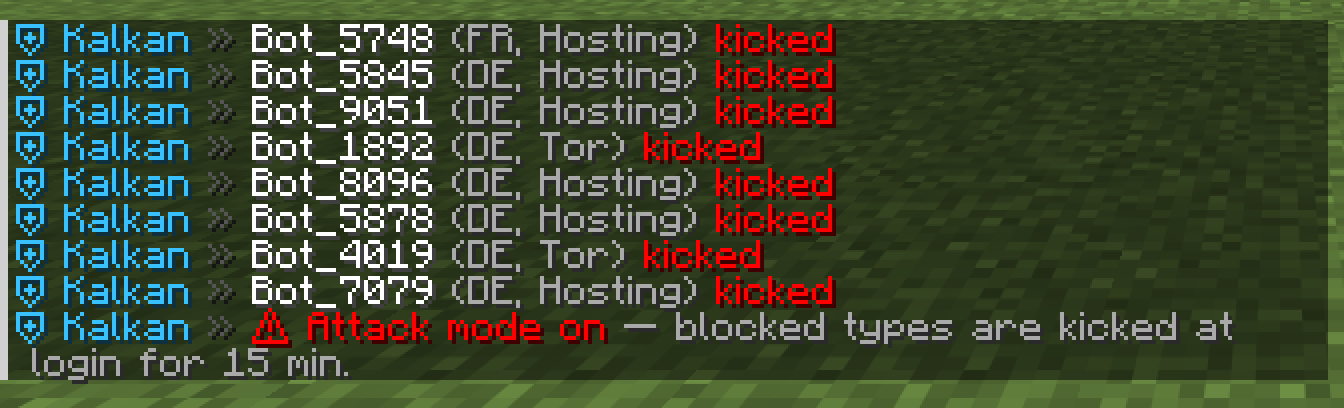
When it starts, staff with kalkan.alerts get a line in chat, the console logs [ATTACK] Attack mode on: 30+ blocked-type logins in the last minute. Blocked types will be kicked for 15 min., and the Discord webhook gets the same. The menu shows ⚠ Attack mode on with the minutes left.
Staff alerts
With staff-alerts: true (off by default), players with kalkan.alerts see a line in chat for every login that is kicked or would be kicked: the name, the country, the connection type and what happened. Each IP is announced once every 10 minutes, so a flood does not drown the chat.
- Hover a line to see the IP, country, network and the reason.
- Click it to open the IP on Scamalytics.
Discord
Put a webhook URL into discord-webhook and Kalkan posts:
- Attack alerts, the moment attack mode starts.
- An hourly summary, only for hours in which something was blocked, would have been, or got in as an exception. For example:
🛡️ Kalkan — last hour (mode: BLOCK)
Login attempts: 412 · kicked: 37 · would kick: 0 · exceptions: 5
Top: AS16276 OVH SAS (FR) ×12 · AS24940 Hetzner Online GmbH (DE) ×9 · AS31898 Oracle Corporation (DE) ×6